Safe Online Shopping Tips to Protect Your Personal Information
A great online deal can turn sour fast if the site is fake, the payment page is unsafe, or a “delivery update” email steals your login. The good news is that safer online shopping does not require advanced tech skills. A few steady habits can protect your personal information and make checkout feel much less risky.
Online shopping is now part of everyday life, from groceries and gifts to clothing, travel items, electronics, and household supplies. That convenience comes with trade-offs. Each purchase can involve your name, address, phone number, email, payment details, and account passwords. Criminals look for ways to collect that information through fake websites, weak passwords, phishing messages, and misleading ads.
The goal is not to shop with fear. It is to shop with a simple safety routine. Once these habits become familiar, they take only a minute or two and can help you avoid the most common problems.

Start with the website before you enter personal information
The website itself gives several clues about whether it deserves your trust. Before typing in your name, address, card number, or account password, pause and look closely at where you are.
A secure website should use `https://` in the address bar. The “s” means the connection is encrypted, which helps protect the information moving between your browser and the site. Most browsers also show a small padlock icon near the web address.
The padlock matters, but it is not a full guarantee. Fake sites can use encryption too. Treat it as one sign, not the only sign.
Look for these details before you buy:
The web address is spelled correctly
Scammers often create addresses that look almost right. A fake site may swap letters, add extra words, or use a strange ending. If you meant to visit a well-known retailer, type the address yourself or use a saved bookmark instead of clicking a random ad or email link.
The checkout page stays on the same trusted domain
Some stores use known payment processors, which can be normal. Still, be cautious if checkout suddenly sends you to an odd-looking address you do not recognize.
The site has clear contact information
A legitimate store usually provides a customer service email, contact form, phone number, physical mailing address, or clear help center. A site with no way to reach support deserves extra caution.
The writing and layout look credible
Typos alone do not prove a site is fake, but awkward wording, broken pages, blurry product photos, and copied-looking policies are warning signs.
The deal makes sense
Deep discounts happen, especially during sales. A brand-new product listed far below normal pricing on an unfamiliar site may be bait.
If you are unsure, search for the store name plus words like “reviews,” “scam,” “complaints,” or “return policy.” Read more than one source. A quick search can reveal patterns, such as late shipping, counterfeit items, or customers who never received refunds.
Public Wi-Fi deserves special care too. Avoid entering payment details while connected to open networks at cafes, airports, hotels, or stores. If you must shop on public Wi-Fi, use your phone’s cellular data or a trusted VPN. At home, keep your Wi-Fi password protected and update your router when updates are available.
Use passwords that can stand up to real attacks
Online shopping accounts often store more than order history. They may include addresses, saved payment methods, loyalty points, gift cards, and refund balances. That makes weak passwords a real risk.
A strong password should be long, unique, and hard to guess. Long passphrases can work well because they are easier to remember and harder to crack than short, complex-looking passwords. For example, a phrase made from unrelated words is usually stronger than a short password with a few numbers added.
Do not reuse passwords across shopping sites. If one retailer suffers a data breach and you reused that same password elsewhere, attackers may try it on other stores, email accounts, banking sites, and delivery apps.
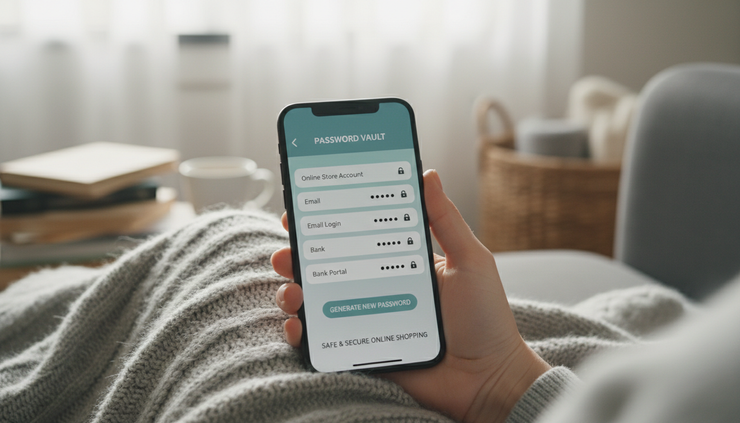
A password manager can make this easier. It can create and store unique passwords for each account, so you do not need to memorize them all. Choose a reputable password manager, protect it with a strong master password, and turn on extra security settings when available.
For shopping accounts, use these password habits:
Choose length over clever substitutions
A longer password is usually better than replacing an “a” with “@” in a short word.
Make every account unique
Your email password, shopping password, and payment account password should not match.
Turn on multi-factor authentication
If a store or payment service offers it, use it. A code from an authenticator app or a security prompt adds another barrier if someone gets your password.
Update passwords after suspicious activity
If you get a login alert you do not recognize, change the password right away and review recent orders, addresses, and payment methods.
Your email account deserves special protection. It is often the reset key for many shopping accounts. If someone takes over your email, they can request password resets on other services. Use one of your strongest passwords there and turn on multi-factor authentication.
Pay in ways that limit exposure
Payment choices can reduce risk. A credit card often gives shoppers stronger fraud dispute options than a debit card because it does not pull money directly from a checking account. Many card issuers also let you create alerts for purchases, which can help you spot unauthorized charges quickly.
Digital wallets can add a useful layer too. Services such as Apple Pay, Google Pay, or PayPal may keep your full card number from being shared directly with the merchant. Availability and protections vary, so review the terms for the service you use.
Some banks and card issuers provide virtual card numbers. These temporary or merchant-specific numbers can be helpful when buying from a store you have not used before. If the virtual number is exposed, you may be able to lock or replace it without changing your main card.
Before checkout, think about what information the store truly needs. A retailer needs shipping and payment details. It does not usually need your Social Security number, account PINs, or a copy of your ID for standard purchases. Be cautious if a checkout form asks for unusually sensitive information.
Be careful with saved cards as well. Saving payment details can be convenient, but stored cards can be misused if your account is compromised. For stores you use rarely, consider checking out as a guest or declining the “save payment method” option.
Keep order records until the item arrives and the return window closes. Save confirmation emails, tracking numbers, receipts, and screenshots of product pages for expensive items. These records can help if the wrong item arrives, the product is not as described, or you need to dispute a charge.
A simple payment safety routine looks like this:
Confirm the web address and secure connection.
Review the cart total, shipping cost, taxes, and delivery estimate.
Use a payment method with buyer protections.
Avoid saving card details unless you trust the retailer and use the account often.
Check your account or card alerts after the purchase.
That routine takes less time than resolving a fraudulent charge or chasing a missing order.
Learn to spot phishing before it catches you
Phishing scams try to trick you into giving away information. They often arrive as emails, text messages, pop-ups, search ads, or direct messages. Around shopping season, they may pretend to be retailers, delivery companies, payment services, or customer support teams.
Common phishing themes include:
A package could not be delivered.
Your account will be locked.
A payment failed.
You won a gift card.
You need to confirm personal information.
A limited-time deal expires soon.
The message may look polished and use familiar colors or logos. Do not rely on appearance alone. Instead, focus on the request and the link.
If a message asks for urgent action, slow down. Scammers use pressure because rushed people make mistakes. Do not click links in unexpected messages. Open your browser or app and go directly to the retailer, delivery service, or payment account.
Check the sender carefully. On email, expand the sender details to see the full address. A message that claims to be from a major retailer but comes from a random-looking domain is a warning sign. On text messages, be wary of shortened links and unknown numbers.
Never share one-time passcodes with anyone who contacts you. A real customer service agent should not ask for your password or authentication code. Those codes are meant to prove your identity, not theirs.

Phishing can also appear in search results. A scammer may buy an ad that looks like a real store or payment portal. Before logging in, check the web address. If you use a store often, bookmark the correct login page.
If you clicked a suspicious link but did not enter anything, close the page. If you entered a password, change it immediately from the real website or app. If you entered payment details, contact your card issuer or payment provider. Fast action can limit damage.
Read reviews with a careful eye
Reviews help you learn what the product page does not say. They can reveal sizing issues, slow shipping, weak packaging, poor customer service, or products that do not match photos. They can also help confirm that a store actually ships what it sells.
Look for patterns rather than one dramatic review. A single angry comment may not tell the whole story. Repeated complaints about the same problem deserve attention.
Good review habits include:
Read the most recent reviews
A store that was reliable two years ago may have changed. Recent feedback gives a better picture of current service.
Check reviews outside the seller’s website
Reviews hosted only on the store’s own product page may be filtered. Search for outside opinions when buying from an unfamiliar retailer.
Look for specific details
Useful reviews often mention fit, materials, delivery time, packaging, customer support, or how the item held up after use.
Be cautious with overly generic praise
Many short, vague, five-star reviews posted close together can be a warning sign.
For marketplace shopping, check the seller as well as the product. A product page may have strong reviews, but the current seller might be different from the one buyers reviewed. Look at seller ratings, shipping origin, return options, and how long the seller has been active on the platform when that information is shown.
Photos from real buyers can be helpful, but they are not perfect proof. Use them as one piece of evidence, along with written reviews, seller history, and the return policy.
Know the return policy before you buy
A clear return policy protects you from surprises. Read it before checkout, especially for clothing, shoes, electronics, furniture, personalized items, beauty products, and sale merchandise.
Pay attention to the details that affect your real cost:
Return window
Check how many days you have to start a return. Some stores count from the purchase date, while others count from delivery.
Condition rules
Items may need tags, original packaging, or an unused condition.
Return shipping
Some retailers offer free returns. Others deduct shipping costs from your refund.
Restocking fees
Large items, electronics, or special orders may come with fees.
Final sale items
Clearance, customized, or hygiene-related products may not be returnable.
Refund method
Some stores refund to the original payment method. Others issue store credit.
If the policy is vague, hard to find, or written in confusing language, be cautious. A trustworthy retailer should make returns and refunds easy to understand before you pay.
For expensive purchases, take a screenshot of the return policy on the day you buy. Policies can change, and having a record may help if there is a dispute. Also inspect deliveries quickly. Waiting too long can make returns harder, especially if the store has a short reporting window for damaged or missing items.
Keep your devices and accounts ready for safe shopping
Safe shopping also depends on the device you use. A secure website and strong password help, but an outdated phone or laptop can still put information at risk.
Keep your browser, operating system, and shopping apps updated. Updates often fix security problems. Use screen locks on phones, tablets, and laptops, especially if they store payment apps or saved passwords.
Avoid installing shopping apps from links in emails or text messages. Use the official app store for your device, and check the developer name, reviews, and permissions. A shopping app should not need access to unrelated information like your contacts or microphone for basic browsing and checkout.
Review your account settings from time to time. Remove old addresses, expired cards, and payment methods you no longer use. Turn on order notifications when available. If a retailer offers login alerts, those can warn you when someone accesses your account from a new device.
It also helps to separate shopping from personal clutter. Consider using one email address for receipts and store accounts. This can make it easier to spot fake messages and track orders. Just make sure that email account has a strong password and multi-factor authentication.

Make safe shopping a simple habit
Online shopping works best when convenience and caution go together. Before you buy, check the website address, use a secure connection, rely on strong unique passwords, and choose payment methods that limit exposure. Watch for phishing messages, read reviews with care, and understand the return policy before you click “place order.”
These habits do not remove every risk, but they reduce the most common ones. They also make problems easier to catch early. Start with one improvement today, such as turning on multi-factor authentication for your email or using a password manager for shopping accounts. Small changes can make every future purchase safer and more confident.
Comments